How a request moves through Glxymesh
From the moment an AI client calls a tool to the structured result it gets back: identity, the project's Lambda, keys at egress and the gateway in between.

In this post
- The six hops every tool call takes
- Where authentication happens, and which kind
- Why your keys never reach the client
Every tool call on Glxymesh follows the same path. Knowing it tells you where to look when something fails, and why the platform can promise that your keys stay on the server.
Request received#
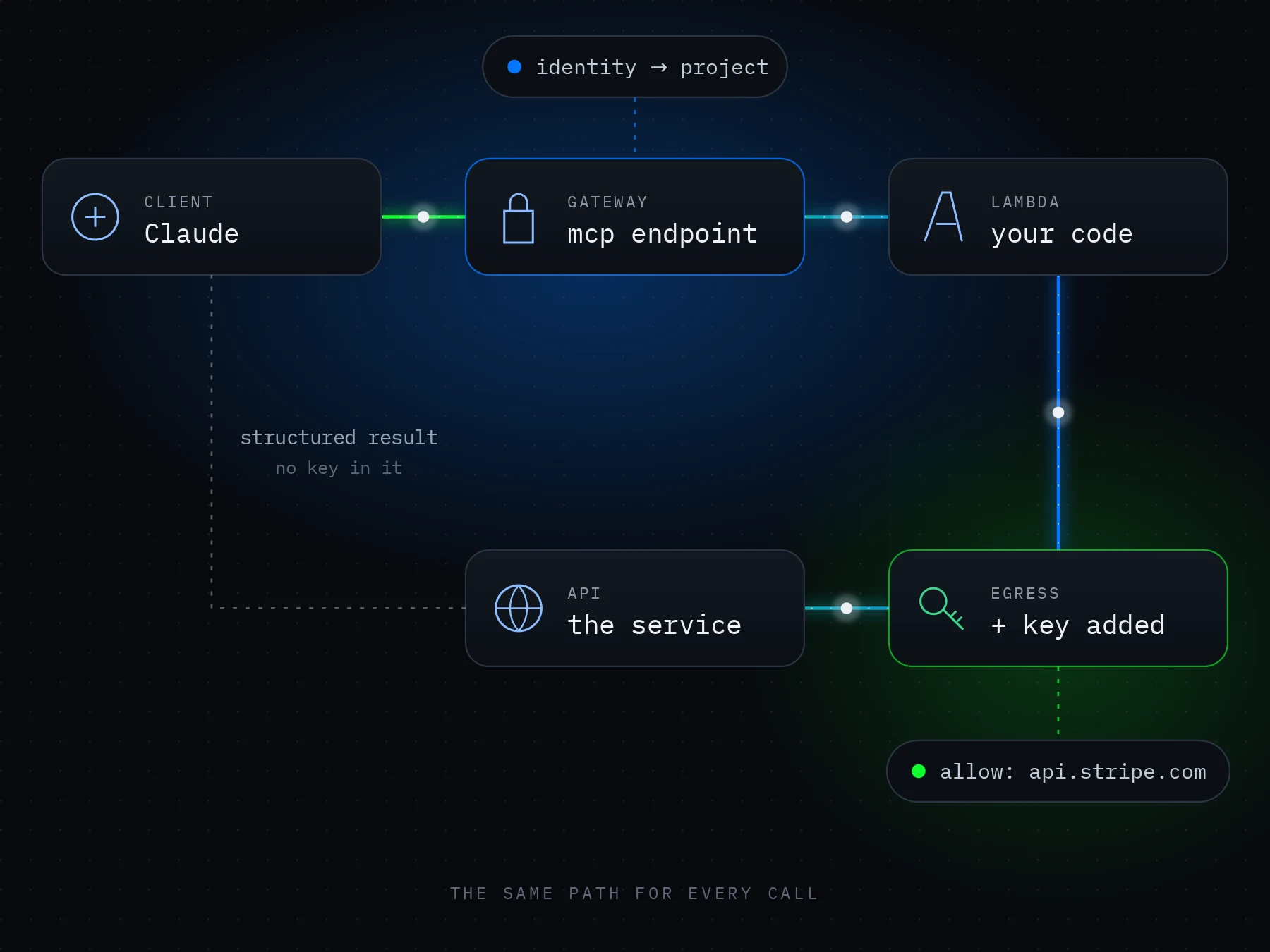
An AI client sends a tool call, such as tools/call → search-knowledge, to your project's MCP endpoint. The request carries the client's Glxymesh access token, not your service secrets.
Identity verified#
The gateway authenticates the user and the client, then checks project access: identity → project → tool permissions.
Tool run#
An http tool is a request described in YAML, so the gateway hands it straight to the egress gateway. A function tool's code runs in your project's own AWS Lambda, which has no network of its own: every request it makes goes out through the egress gateway too.
Key added on the way out#
The egress gateway checks that the host is one the tool lists, then adds the project secret bound to that host, as a header or a query parameter. Your code never holds the key, and the calling client never sees it.
Data retrieved#
The request reaches your data or model API with its credential, and the answer comes back the same way. Model API authentication belongs to this outbound call, not to the inbound MCP session.
Result returned#
The function returns a structured result through the gateway to the client that asked. The call completes, and its outcome stays visible in the console.
| Hop | What happens |
|---|---|
| Request | Client calls the project endpoint with its access token |
| Identity | Gateway checks user, client and project access |
| Run | An http tool's request, or your code in the project's Lambda |
| Key | Egress checks the host and adds the key bound to it |
| Data | Outbound call to your data or model API |
| Result | Structured result returns through the gateway |