Ada on your website: a chat and live calls, in one Inbox
Watch the 73-second demo: Ada answers on your website in your colours, takes live calls from the chat, and every chat and call lands in the same Inbox as WhatsApp.
In this post
- The demo, in 73 seconds
- A chat that looks like your shop
- Tap the phone and talk
- One Inbox for web and WhatsApp
Most people with a question on your website never ask it. They look for a way to reach you, don't find one, and leave. Ada already answers your customers on WhatsApp. Now she answers on your website too, by chat or by voice, and your team sees all of it in one place.
A chat that looks like your shop#
Add one line to your site and the chat appears in the corner. It shows your logo and your colour, in light, dark or whatever the visitor's device prefers. It only loads on the website you verified.
<script src="https://chat.glxymesh.com/v1/widget.js" data-org="your-org" async></script>
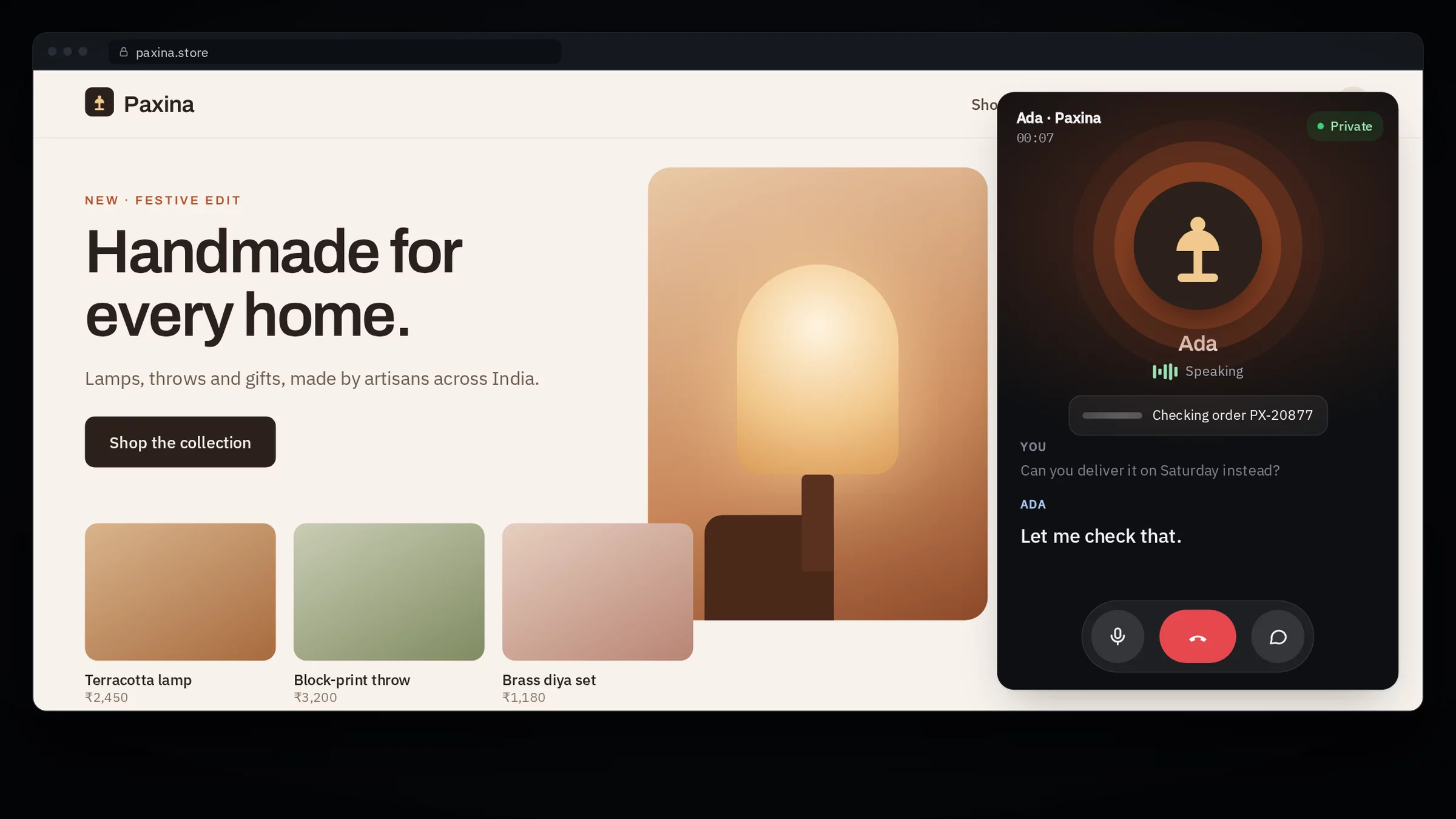
Ada opens with the questions your customers ask most, picked from your top questions, so most people just tap one. Her answers appear as she writes them, and she uses the same knowledge, rules and tools as on WhatsApp. When she needs to look something up, like where an order is, she uses your own tools and says she's checking.
Tap the phone and talk#
When typing is too slow, the visitor taps the phone in the chat header and talks to Ada. There's no number to dial and nothing to install. She starts answering as soon as they stop speaking, and if a lookup takes a moment she tells them so instead of going quiet.
Anything that changes data still needs the customer's OK. On a call, Ada asks the question out loud and shows it on screen at the same time, so they can say yes or tap Yes. If they ignore it, the question goes away. The chat stays open for the whole call, and Ada hangs up after a minute of silence.
One Inbox for web and WhatsApp#
Every web chat and every call lands in the same Inbox as your WhatsApp chats. Calls come with the full transcript, voice lines are marked, and a chat that's on a call right now shows it.
When a person is needed, Ada hands the chat to a free teammate whose queue fits. Chats stay private to the team until she does. A teammate can also move a web chat to WhatsApp or carry on by email, so the conversation doesn't end when the visitor closes the tab.
| Feature | What it does |
|---|---|
| Chatbox | Ada on your website, with your logo and colours |
| Suggested questions | Your customers' top questions, one tap away |
| Live calls | Voice from the chat, with spoken or tapped yes |
| One Inbox | Web chats, calls and WhatsApp, with transcripts |
| Move this chat | Continue on WhatsApp or by email |
Turn it on#
Chatbox is part of the Support desk on the Team plan. Open Support desk, then Chatbox, paste the line into your site and switch live calls on if you want them. Calls are billed from AI credits per started minute. The Chatbox guide covers signed-in visitors, the share link and every setting.
Explore MCP guides by task: creation, hosting, connections and security.